Portable Guitar Pro v8.1.5.31 with Soundbank (x64) Multilingual
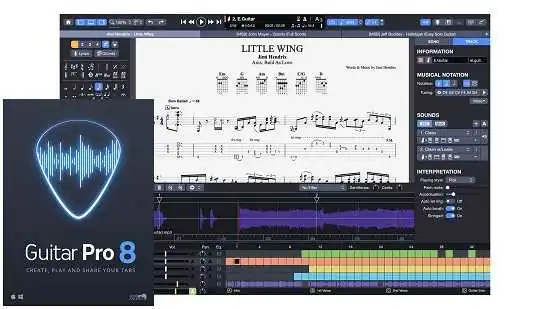
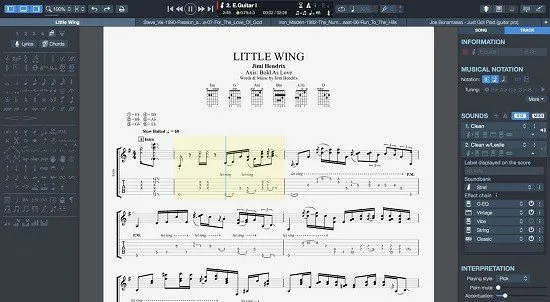
Guitar Pro Portable is a sophisticated music‑notation and tablature‑editing software specifically tailored for guitarists, bassists, drummers, pianists, and multi‑instrumental musicians who want to create, view, and play back standard sheet music, guitar‑style tablature, and full‑band arrangements on a computer.
It functions simultaneously as a composition tool, a learning aid, and a virtual backing‑band workstation, allowing users to build detailed scores that combine conventional staff notation with intuitive tablature, set tempos and time signatures, and listen to a realistic playback of the entire arrangement.
Because of this blend of editing power and real‑time playback, Guitar Pro has become one of the most widely used tools in the guitar‑tab and transcribing community, serving both hobbyists and professional musicians.
Core concept and main purpose
At its heart, Guitar Pro is a digital tablature and score‑writer that treats instruments such as guitar, bass, drums, piano, and many others as first‑class citizens in the same project. Instead of forcing you to choose between reading standard music notation or learning to read tablature, the software displays both in parallel: a staff for sight‑reading musicians and a tablature staff beneath it that shows precisely which frets and strings to play. This dual view makes it easier for players at all levels to understand how musical ideas translate into physical finger positions on the neck.
The software is built around three primary goals:
-
Composition and arrangement: letting you write your own songs, riffs, or full multi‑track arrangements by entering notes, chords, and effects directly into the editor.
-
Transcription and study: helping you learn and analyze existing songs by importing or creating tablatures that can then be played back at adjustable speeds, isolated by track, or looped over specific sections.
-
Play‑along practice: acting as a virtual band that plays your score back in real time, so you can practice each part while following on‑screen tablature, with features such as adjustable tempo, looping, and metronome support.
This combination turns Guitar Pro into much more than a simple tab viewer; it becomes a complete environment for writing, listening to, and practicing your music in a way that feels closely tied to the actual playing experience.
Dual notation: tablature and staff
One of Guitar Pro’s defining features is its tight integration of standard staff notation and guitar tablature. When you open a score, each instrument typically appears with two staves:
-
A conventional music staff using standard noteheads, beams, and rests, suitable for musicians who are comfortable with traditional notation.
-
A tablature staff beneath it, showing the exact frets and strings for guitars and basses, and symbolic diagrams for drums and other instruments.
Both staves are dynamically linked: editing a note on the tablature staff automatically updates the corresponding note on the standard staff, and vice versa. This means you can:
-
Edit quickly using the tablature (for example, by clicking on the fretboard‑style grid) while still generating proper sheet music.
-
Record or enter notes via the standard staff and then see exactly where they fall on the neck.
-
Print or export fully notated scores that can be used in more traditional musical settings, while still keeping the fret‑by‑fret clarity of tab for guitar‑focused musicians.
In addition to tab and standard notation, many versions of Guitar Pro also support rhythmic or rhythmic‑box notation for quick, drummer‑friendly representations of beats and grooves, especially useful when writing out drum parts without the complexity of full‑notation drum‑kit writing.
Multi‑instrument tracks and full band arrangements
Unlike tools that are limited to solo guitar, Guitar Pro can handle dozens of instrumental tracks within a single file, letting you build full band arrangements similar to what you might see in a digital audio workstation or notation program. Typical tracks can include:
-
Rhythm guitar and lead guitar, each with its own tuning, voicing, and effect settings.
-
Bass guitar, often with separate electric‑bass or upright‑bass sound profiles.
-
A complete drum kit, with standard MIDI‑drum mapping for kick, snare, toms, cymbals, and hi‑hat.
-
Keyboard parts (piano, organ, synth) and other instruments such as strings, brass, or percussion.
Each track can be muted, soloed, or mixed independently, which is extremely useful when:
-
Learning a specific part (for example, isolating the bass or drums and looping that track).
-
Studying how different instruments interact in a song.
-
Arranging your own compositions by layering multiple parts and then adjusting levels and panning in the mix.
You can also set individual tunings, numbers of strings (from 3 to 10‑string guitars, basses, and other stringed instruments), and even custom string‑orderings, which is essential for players who use alternate tunings or unusual instruments.
Playback engine and sound options
Guitar Pro includes a built‑in audio engine that generates realistic playback from the tabs and notation in your score. Rather than relying solely on basic MIDI sounds, later versions incorporate a “Realistic Sound Engine” that uses high‑quality sample‑based instruments to emulate guitars, basses, drums, keyboards, and other instruments with much greater expressiveness. This engine allows you to:
-
Set the sound or “patch” for each track, choosing between different guitar types (acoustic, electric, classical), bass tones, drum‑kit styles, pianos, and more.
-
Adjust volume, panning, reverb, and other mixing parameters per track, so you can create a balanced mix that closely resembles a real band performance.
-
Automate these parameters over time, for example fading a guitar in gradually or changing the drum‑kit EQ at a bridge section.
The playback system is tightly synchronized with the notation and tablature, so as the virtual band plays, the current note or measure is highlighted in the score. This lets you:
-
Follow along visually while the audio plays, improving your timing and note‑reading accuracy.
-
Practice with a steady, metronome‑like rhythm section, optionally overlaid with a visible metronome or click‑track display.
-
Export the final mix as an audio file (for example, WAV or MP3) so you can share it with others or use it as a backing track for live performance or recording.
Because the software can mix MIDI‑style notation data with sample‑based playback, you end up with a flexible environment that can sound anywhere from simple and lightweight to richly detailed and studio‑like, depending on your settings and available sound resources.
Learning, practice, and teaching tools
Guitar Pro is widely used as a learning and practice tool, especially for guitarists and bassists who want to develop their technique, repertoire, and theoretical understanding. The software includes several features that specifically support this use case:
-
Adjustable tempo: you can slow a song down to half‑speed or less, making it easier to hear and execute fast or complex passages.
-
Looping sections: you can select a small segment of the song (such as a solo or riff) and loop it repeatedly, letting you drill that part until it becomes comfortable.
-
Metronome and visual countdown: a built‑in metronome helps develop timing, while visual cues and countdowns prepare you for the start of a measure or section.
-
Track muting and isolation: you can mute your own instrument and play along with the rest of the band, or mute the backing band and play the full arrangement yourself.
Many versions also include a virtual fretboard or “neck view” that highlights the exact fingering positions as the song plays back. This visual aid helps you:
-
See how chord shapes or scale patterns move across the neck.
-
Understand the logic behind voicings and alternate positions.
-
Build a mental map of the instrument that complements the raw tablature.
Teachers and private instructors often use Guitar Pro to create custom lesson scores, share tablatures with students, and provide backing tracks that make practice sessions feel more like playing with a real band than simply reading static notation.
Tablature creation and editing workflow
Writing in Guitar Pro revolves around a grid‑based, tablature‑centric interface where you can enter notes by clicking on a virtual fretboard, drawing on the tablature staff, or using keyboard shortcuts and numeric input. The workflow is typically:
-
You open a new or existing score and choose the number of instruments, their tunings, and the time signature and tempo.
-
You enter notes either by:
-
Clicking on the correct string and fret in the tablature staff.
-
Using the virtual‑neck panel, which shows a visual representation of the guitar neck; you click on the desired position, and the software inserts the note automatically.
-
Using keyboard input (for example, typing fret numbers or chords from a palette).
-
-
You add rhythmic information via note durations (whole notes, half notes, quarter notes, etc.) and ties or dotted rhythms, either directly on the staff or through context menus.
-
You refine the part by adding guitar techniques, such as hammer‑ons, pull‑offs, slides, bends, vibrato, palm‑mutes, tremolo picking, and tapping, all of which can be notated in the tablature with specific symbols.
-
You fine‑tune the musical structure by setting repeats, codas, segno marks, and tempo changes, which Guitar Pro will respect during playback.
Because the software supports so many techniques and symbols, the resulting tablatures can be very detailed, capturing not only which notes to play but also how to play them, including dynamics, articulations, and stylistic nuances. This makes Guitar Pro tablatures far richer than the bare‑bones text‑based tabs that circulate on many websites.
Chords, scales, and harmony tools
To help with composition and improvisation, Guitar Pro includes chord and scale tools that integrate directly into the score‑writing workflow:
-
Chord diagram support: you can place chord symbols above the staff, and the software can display standard chord diagrams showing finger positions for each chord.
-
Scale overlays: some versions allow you to view common scales (pentatonic, major, minor, modes, etc.) on the virtual fretboard, so you can see which notes are available in a given key while you compose or improvise.
-
Chord detection and suggestions: when you select a group of notes, Guitar Pro can suggest possible chord names or alternative voicings, helping you refine your harmony choices.
These tools are especially helpful for:
-
Songwriters who want to quickly sketch chord progressions and then convert them into guitar‑and‑bass arrangements.
-
Improvisers who want to practice soloing over specific chord changes, seeing both the chords and the underlying scale shapes on the fretboard.
-
Classroom settings, where teachers can visually explain how chords and scales relate to the fretboard and to the staff.
Tempo, time signatures, and automation
Guitar Pro also serves as a notation‑level DAW for tempo and structural changes. You can:
-
Set the base tempo and easily change it at any point in the song (for example, slowing down for a cadenza or accelerando).
-
Switch between different time signatures (4/4, 3/4, 6/8, odd meters, etc.) and have the software automatically adjust the beat‑counting and note‑placement accordingly.
-
Add repeat signs, coda marks, and jump‑back instructions that the playback engine follows, just like a conductor would on a printed score.
Newer versions increasingly include automation for parameters such as:
-
Volume and panning, which can change over time to create fades, swells, or dynamic‑mix shifts.
-
Effects or sound‑patch changes, letting you model different amp settings or tones during different sections of a song.
-
Focus/unfocus modes that highlight a single track or a small group of instruments, making it easier to concentrate on the part you are transcribing or practicing.
These automation features bring Guitar Pro closer to a light‑weight notation‑oriented DAW, blurring the line between a pure sheet‑music editor and a full‑fledged recording environment.
Importing audio and transcription workflows
An increasingly important feature set in Guitar Pro is audio‑track support and transcription assistance. You can:
-
Import an audio file (such as a WAV or MP3) into your project and play it alongside your tablature, using the software as a looping, slowing‑down, and muting tool while you transcribe.
-
Use the built‑in playback controls to isolate sections, slow tempos, and loop passages, which greatly simplifies the process of notating solos, bass lines, or complex rhythms.
-
Export your completed tablature back as a synchronized audio‑backing track, so students or collaborators can practice with a realistic accompaniment.
This workflow is especially valuable for:
-
Transcribers who want to turn recordings into fully notated scores that can be shared with other musicians.
-
Students who need accurate, clear arrangements of their favorite songs rather than error‑prone community‑shared tabs.
-
Band‑leaders or arrangers who want to capture ideas quickly and then distribute parts to other members.
Export, sharing, and publishing
Guitar Pro supports a range of export and sharing options, making it easy to integrate your work into other parts of your workflow:
-
Printed scores and tablature: you can print or export the score as PDF, which preserves both staff and tablature along with chord diagrams and formatting.
-
Audio exports: you can render the playback as an audio file that can be burned to CD, uploaded to streaming platforms, or shared with bandmates as a reference track.
-
MIDI exports: the software can generate MIDI files that can be imported into other digital audio workstations or notation programs for further editing or remixing.
-
Custom file formats: Guitar Pro’s native
.gp‑family formats (such as.gpxor.gpt) are optimized for storing all the tablature, effects, and instrument‑specific data, and there is a large existing ecosystem of shared files in these formats.
Because of the rich feature set and the popularity of the format, Guitar Pro has become a de facto standard for distributing guitar and bass tablatures, particularly among more serious players who demand accurate, playable arrangements rather than simplified text‑only tabs.
Overall user experience and strengths
Guitar Pro Portable is designed with a musician‑first mindset, so its interface emphasizes clarity and immediate playability rather than abstract technical controls. The layout usually centers around a large score window, with side panels for fretboard views, track mixers, and tool palettes. Keyboard shortcuts are extensive, allowing fast entry and editing once you become familiar with the workflow.
Its main strengths lie in:
-
Combining tablature, standard notation, and realistic playback in one environment.
-
Supporting a wide range of instruments and tunings, including advanced configurations such as 7‑ or 8‑string guitars and custom‑tuned basses.
-
Providing powerful practice and learning tools such as adjustable tempo, looping, track isolation, and visual neck‑position diagrams.
-
Enabling detailed effect and technique notation, so tabs can capture not just “what notes” but “how to play them.”
-
Acting as both a creative tool for composers and a study tool for students and performers.
For guitarists, bassists, drummers, and keyboard players who want to move beyond static text‑based tabs and into richly detailed, playable scores, Guitar Pro offers a comprehensive, intuitive, and musically expressive environment that supports the full arc of the musical process—from writing and arranging, through transcription and practice, to performance and publishing.
Guitar Pro 8, a major step forward
This new version of Guitar Pro Portable is the result of several years’ worth of development, and aims at meeting the expectations of our users by focusing on the specific needs of musicians. A redesigned interface, with a better rendering of your scores, audio improvements, and new tools – discover the many new features of Guitar Pro 8.
Top features in Guitar Pro 8:
Wide-ranging new features and enhancements, for creating, playing, and sharing your tabs! Guitar Pro Portable allows you to edit your music scores and tablature for guitar, bass, and ukulele, as well as create backing tracks for drums or piano. This is a most thorough yet user-friendly tool for musicians who wish to get better, compose, or simply play along.
New main features and big improvements
1. Fixed tempo learning mode
A dedicated “Fixed Tempo” mode lets you ignore all tempo changes and automation in a score. This is aimed at learners who want to practice difficult passages at a constant, slower speed without the file’s tempo jumps or accelerandos interfering, making it easier to build clean technique step‑by‑step.
2. Line‑in sound‑preset locking
You can now lock the sound preset of your line‑in audio. This means the software keeps the same guitar‑amp or effect sound applied to your line‑in input even when you switch tracks or close and reopen a file, so you do not need to reconfigure it for every session.
3. Virtual effect‑chain “pedalboard”
Guitar Pro adds a virtual pedalboard interface where you can build a custom effects chain (such as overdrive, reverb, delay, or modulation) and apply it to your sound settings. You can:
-
Create and save your own effect combinations.
-
Adjust the duration, offset, and relative velocity of individual notes so that articulations feel more natural and expressive.
This brings the software closer to a light‑weight composition and tone‑design environment, rather than just a tablature viewer.
4. Enhanced engraving and notation refinement
Several engraving‑layer improvements have been rolled in, including:
-
Fixed accidental display for bended notes so that accidentals are shown correctly and not redundantly.
-
Proper handling and redraw of whammy‑bar indications and sustain‑pedal symbols after reopening a file.
-
Better stem‑direction control and visual consistency for certain types of notes and rests.
These changes make printed or exported scores look cleaner and more professional.
5. Tempo and transposition refinements
The latest version refines how the software handles tempo and key changes:
-
Decimal‑point tempo values are now supported, so you can set tempos more precisely (e.g., 123.5 BPM).
-
Sub‑30‑BPM tempo support makes it easier to work with extremely slow practice or composition sections.
-
Diatonic transposition is available, letting you shift a piece in a key‑aware way instead of just shifting all notes mechanically.
-
Chord names and fingerings are transposed together with their underlying notes, so chord diagrams and voicings stay logical when you move the score to a different key.
These features are especially useful for both arrangers and educators who work with complex harmonic progressions.
6. Numerical notation and fretboard‑theory views
Additional music‑theory‑oriented options have been added:
-
Jianpu (numbered musical notation) is now supported, which is common in Chinese music education and some pedagogical systems.
-
Slash notation for drums and standard music notation has been improved, making it easier to notate rhythmic‑style drum parts or simplified piano chords.
-
Cautionary accidentals can be shown, helping players avoid mistakes at key‑signature boundaries.
There are also improved fretboard and keyboard views that react to the current notes being played, aiding understanding of scale patterns and interval relationships.
Export and file‑handling upgrades
1. New image‑export formats
The software now supports:
-
Exporting scores to PNG with transparent backgrounds, which is useful for inserting notation into transparent overlays, presentations, or web graphics.
-
Exporting to SVG (Scalable Vector Graphics), giving you resolution‑independent vector images of your scores that can be scaled without pixelation.
These exports are handy for teachers, YouTubers, and social‑media content creators who want clean, sharp images of music notation.
2. Better Guitar Pro 5 and MusicXML handling
Interoperability with older Guitar Pro formats and MusicXML has been tightened:
-
Guitar Pro 5 files export fingerings correctly and now handle grace‑note transitions (bend/slide/hammer‑on) properly.
-
MusicXML improvements include:
-
Better handling of harmonies and multiple voices on the same staff.
-
Correct processing of “slash” attributes and chord‑over‑note‑layout issues.
-
Ability to import/export chords even when they stand alone without explicit note events.
-
These changes make it safer to move files between Guitar Pro and other notation or DAW software.
3. Performance and stability tweaks
Several under‑the‑hood fixes target responsiveness and stability:
-
Improved performance on Apple Silicon Macs, with smoother rendering and playback.
-
Resolved crashes related to undo operations, effect‑editing, audio‑device refresh, and certain third‑party audio drivers.
-
Fixed issues where inserting or deleting beats did not always update sound events correctly, or where rests were misplaced during MIDI export.
These updates make the software feel more reliable during long editing sessions.
User‑interface and workflow refinements
1. Contrast and color adjustments
The interface has received a visual refresh with adjusted contrast and colors to improve reading comfort, especially under different lighting conditions or on high‑contrast displays.
2. “Pin” files in recent‑files list
You can now pin frequently used files in the recent‑files section of the homepage, so that essential lessons, arrangements, or projects stay visible at the top of the list instead of being pushed down by new files.
3. Copy/paste and editing improvements
Editing gestures have been refined:
-
Better handling of clipboard operations so that copied elements (notes, measures, tracks) paste more predictably.
-
Smoother handling of stem‑direction and notation‑element positioning when pasting into complex layouts.
This reduces the need to manually re‑adjust layout after basic copy‑paste operations.
4. Filters in mySongBook
For users of the mySongBook catalog, filters have been added so you can narrow down the score library by instrument, style, difficulty level, or other metadata, making it easier to find suitable material quickly.
Mobile and visual‑practice enhancements
While the desktop version remains the main workhorse, the latest ecosystem updates also touch mobile and visual tools:
-
Mobile‑oriented features emphasize:
-
Dynamic zoom and multi‑track views to let you see the full arrangement at a glance or zoom into a single instrument’s part.
-
Improved fretboard and keyboard views that react to the score, showing which notes and scales are active in real time.
-
Dark‑mode support for practicing in low‑light environments without straining your eyes.
-
-
Audio‑track and library integration:
-
You can play audio tracks directly from the app, including scores stored in your mySongBook library, so you can listen and follow the tablature in one session.
-
New export options let you share images of scores (e.g., JPEG/PNG) more easily, simplifying the process of sending practice materials to students or bandmates.
-
Release Notes:
While Guitar Pro 8 introduced the “Audio Track” and “Pedalboard,” the 8.1 update refined the workflow and added specific notation tools:
- SVG Export: You can now export scores as scalable vector graphics. This is a game-changer for teachers and content creators who need high-quality images for books or websites.
- Jiǎnpǔ Notation: Support for the numbered musical notation system used widely in China and other parts of Asia.
- Enhanced mySongBook Integration: A selection of high-quality tabs from the official library is now available for free to all users periodically.
Performance Fixes:
- Improved MIDI export accuracy (especially for staccatos and anacrusis).
- HiDPI/Retina display fixes for smoother UI rendering on high-resolution monitors.
- Audio Fine-Tuning for grace notes.
Notable Bug Fixes (Recent Patches)
If you’ve noticed stability issues, the most recent minor patches addressed several common gripes:
- Audio Driver Stability: Fixed crashes related to Blackhole and SoundFlower drivers on macOS.
- Score Engraving: Corrected collisions between piano fingerings and fixed disappearing whammy bar indications during playback.
- Search Engine: The file browser is now significantly faster when indexing large folders of
.gpfiles.