Portable Darktable v5.4.0 (x64)
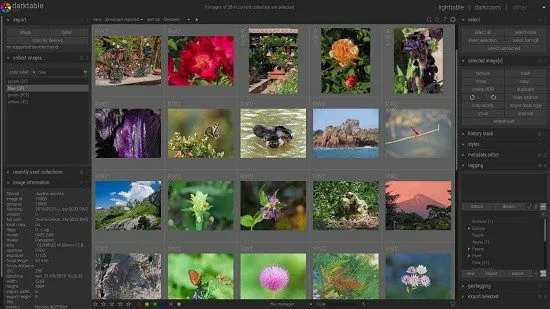
Darktable is an open-source and cross-platform photography workflow application that has been around for quite some while now and is available for Windows and can be be considered valid Alternative to Adobe Lightroom.
Having developers that are also avid photographers as part of the target audience is good for understanding the real world problems, challenges, and workflows.
darktable is a photography workflow application and raw developer. A virtual lighttable and darkroom for photographers. It manages your digital negatives in a database, lets you view them through a zoomable lighttable and enables you to develop raw images and enhance them.
darktable edits your images non-destructively all the way through its pipeline. Your original image is never modified! Professional color management features ensure fidelity all the way to print and GPU accelerated processing means you can speed up your workflow using your video card.
Currently darktable contains 61 image operation modules. Many modules support powerful blending operators offering blend functionality that works on the incoming image information and the output of the current module or be used with drawn masks.
Main modules:
Basic image operations
Tone image operations
Color image operations
Correction modules
Effects/artistic image postprocessing
With that out of the way, here’s what you can expect from darktable. Firstly, besides the plethora of image (and RAW image) processing tools with all the bits and bobs, you will also notice that the app is pretty useful when it comes to helping you manage photos.
A very popular image processor with photo management superpowers, now available for Windows as well
Actually, it aims to sport a smooth balance between a typical raw image converter and processor and a basic (database-specific) image management tool, all for the sake of allowing you to work with your pictures as efficiently as possible. You can perform flexible database queries, perform image searches based on tags, rating and color labels, as well as filter and sort your image collections.
One of the app’s highlights stems from the fact that it allows you to import a wide array of image formats such as JPG, CR2, HDR, PFM, just to name a few. Just as important is the app’s export system which makes it easy for you to create Picasa and Flick web albums, HTML-based web galleries and export pictures to formats such as JPEG, PNG, TIFF, PPM, PFM, EXR.
Surprisingly well-equipped utility that handles most image operations with ease
However, by and large, darktable is best known for its image processing operation modules. As mentioned before, it’s capable of handling most basic image processing tasks. It helps you invert, crop, or rotate pictures, tweak the exposure, reconstruct the color info, set the white balance, correct various saturation or color-related levels, remove noise, apply lens correction, remove spots, fix chromatic aberrations, and sharpen any image, just to give you an example.
darktable does not disappoint when it comes to image processing effects either. It provides you with the options to add watermarks and frames, add vignettes and grain to your pictures, as well as various other interesting effects (Orton, bloom, colorize, graduated density).
You should also know that darktable allows you to preview your image collections in a slideshow mode, which truth be told, is not yet in tip-top shape on Windows. Last but not least, the app allows you to visualize a wide array of details about your photos and even edit their metadata and geo-metadata.